Your long videos already have the Shorts in them.
Five Star Clips scans a stream, podcast, interview or gameplay video for the loud, fast moments, cuts them to vertical with captions, lets you polish them in a full editor, and gives you finished Shorts to post. You pay once. Your videos never leave your PC.
- No monthly fee or credits
- 7-day free trial
- Nothing uploaded
- No account needed
- Works on 2 of your PCs
Three steps, about five minutes.
The app does the watching. You stay in charge of what goes out.
Drop in a video
Drag in a file or paste a YouTube link. Five Star Clips scores every second for loudness, scene cuts and, if you want, speech.
Check the moments
See a hype map of the whole video and the best moments side by side. Let the AI re-rank them if you like, preview each one and nudge the start and end.
Edit, export and post
Get vertical 1080×1920 clips with captions, a cover and ready-to-copy titles. Polish any clip in the editor, then plan post times in the queue.
From one long video to finished Shorts.
Real screens from the app, made from a demo video. Press play to watch the whole thing in under a minute.
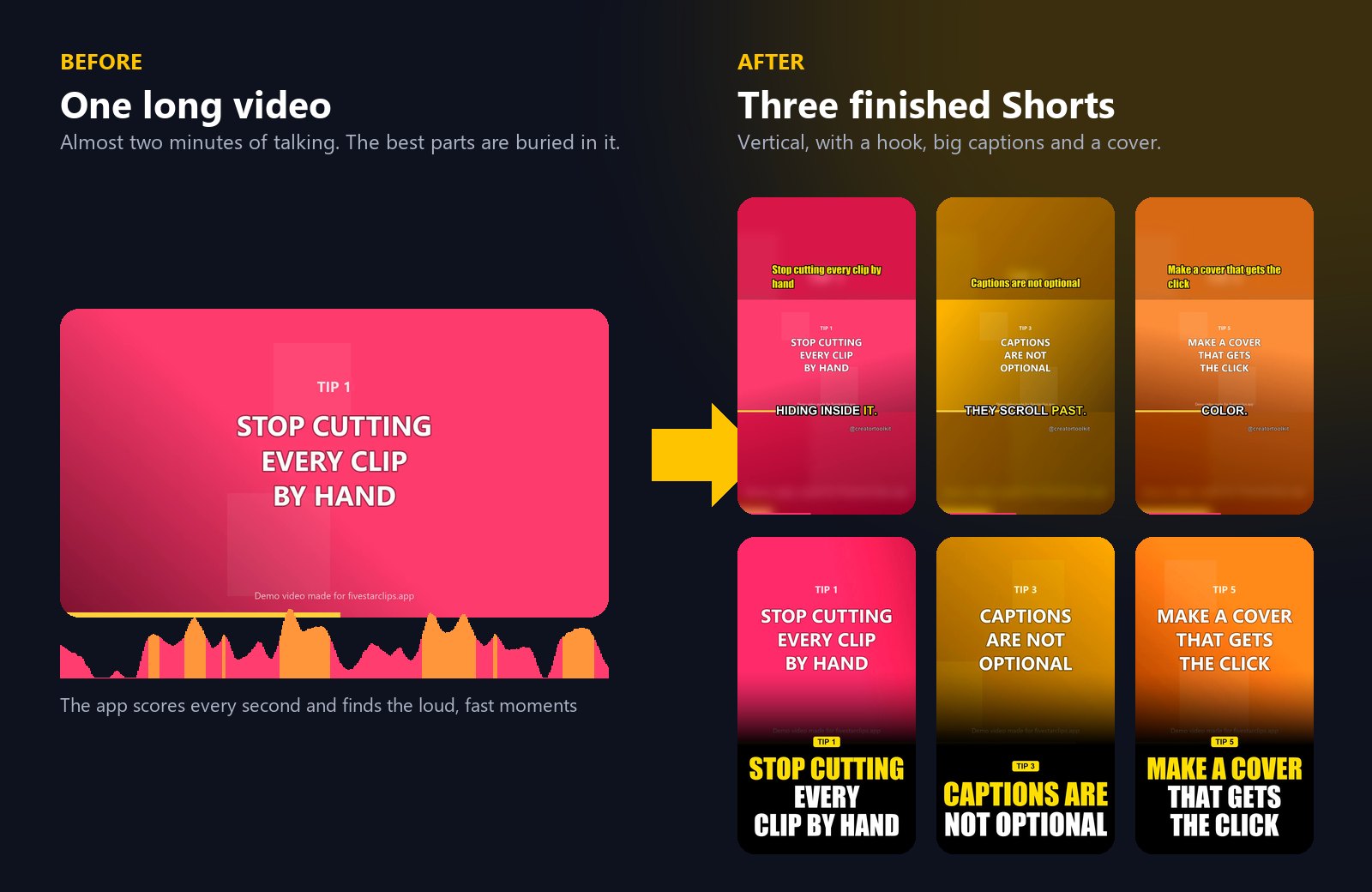
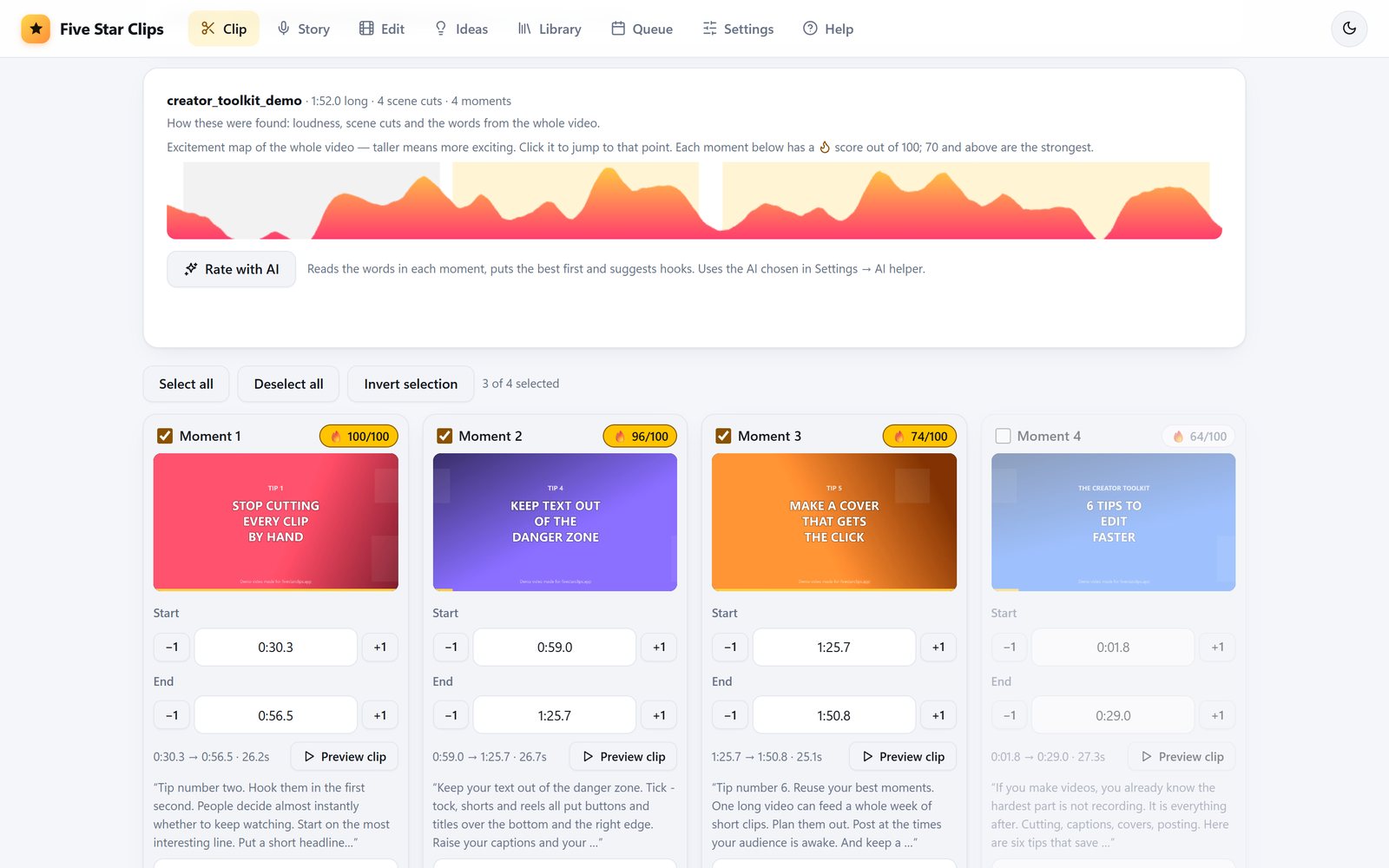
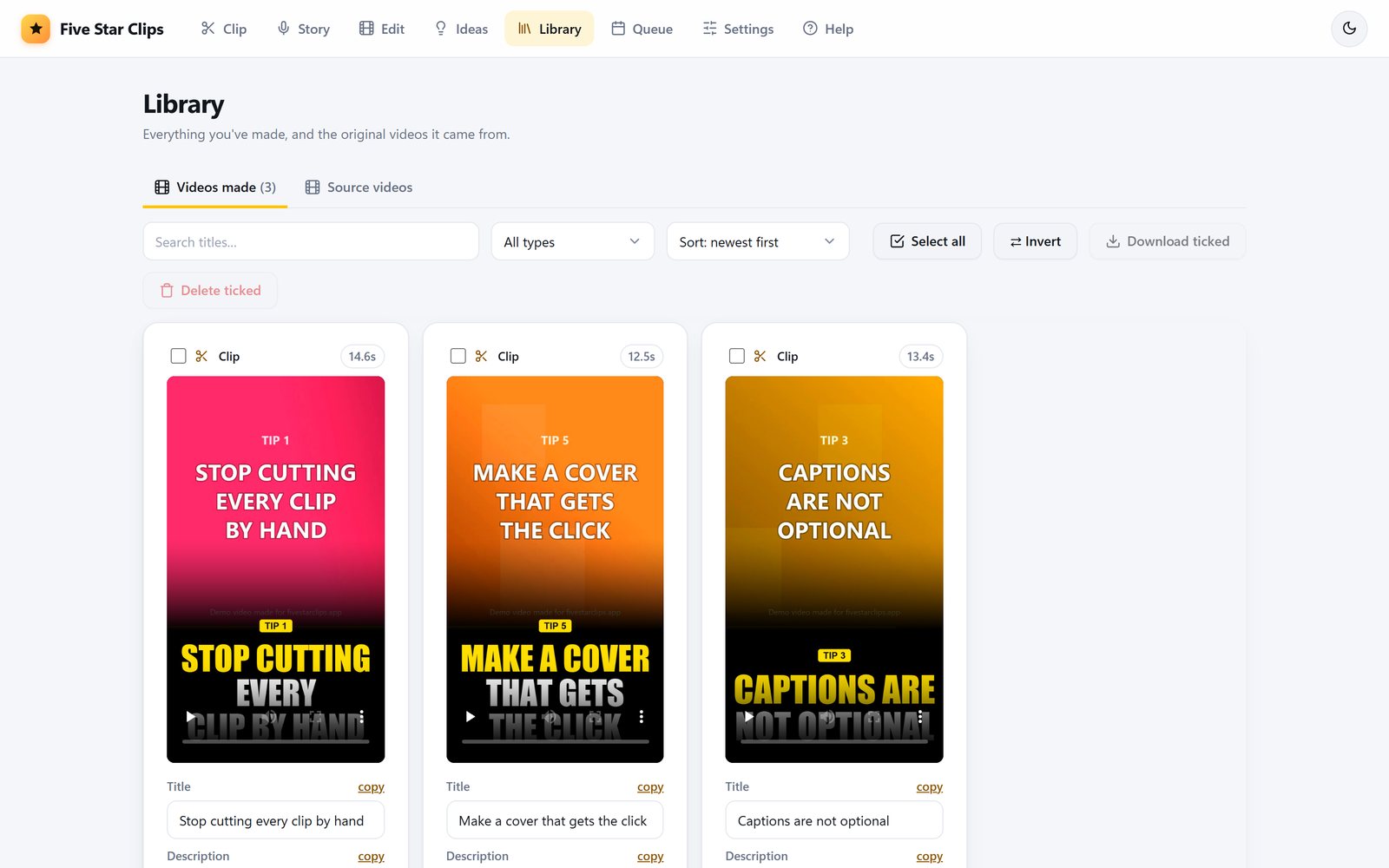
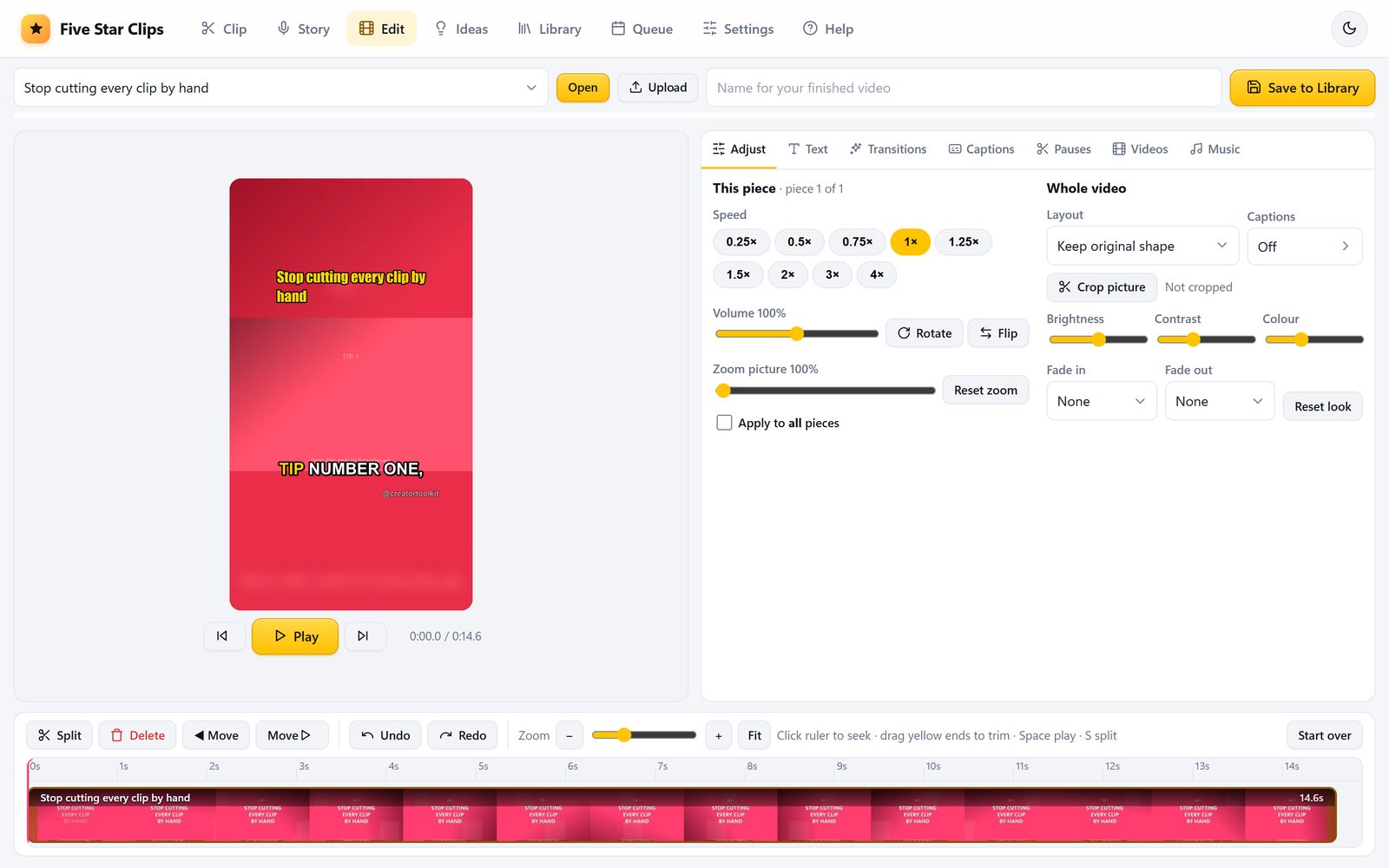
The examples use a demo video made for this page. Your own videos stay on your PC.
Everything a clipper needs, in one app.
Built by a creator for running a real Shorts channel, not as a demo.
Moment finder
Finds the best moments in hours of footage and snaps each cut to a scene change or a quiet beat, so clips don't start mid-word.
AI that picks the best
Optional. A free AI on your PC, or your own free or paid key (Gemini, Groq, Claude, ChatGPT and more) reads the words and rates every moment. Only text is ever sent, never your video.
Captions that move
Five caption styles, including karaoke, where each word lights up as it's spoken. Made on your PC, offline, and editable line by line.
A real editor, built in
Split, trim, reorder, speed up, zoom and crop. Add text, background music and transitions, join several videos, and cut out the pauses in one click. Right-click anything on the timeline for its options.
Voiceover Shorts
Paste a script, pick one of eight natural voices, and the app cuts the most exciting footage to fit the voice.
Ideas tab
Fresh headlines for your niche, plus hooks, titles and a script outline for any story.
Library
Every clip you've made, with its cover, title and description. Edit, copy, or download one or a whole batch as a zip.
Posting queue
Fills your posting times, tracks which platforms each video has gone to, and opens the upload pages for you.
Finish every clip your way.
Not happy with a cut? Open it in the timeline editor and fix it, with no second app and no export round-trip.
- Drag and drop videos and music straight onto the timeline.
- Auto-cut pauses to keep talking clips fast.
- Fix captions word by word, then style them.
- Music, text and transitions that sit on their own timeline lanes.
Pay once, clip as much as you like.
Most clipping apps are monthly subscriptions that charge by the minutes of video you upload. Five Star Clips runs on your computer, so there's nothing to meter.
| Typical online clipping app | Five Star Clips | |
|---|---|---|
| Price | Around $15–$30 every month | £29 once |
| Limits | Monthly allowance of upload minutes | None. Clip as much as your PC can handle |
| Your videos | Uploaded to their servers | Stay on your PC |
| Videos with little talking (gameplay, sport, events) | Many pick moments mainly from speech | Reads sound and action, not just words |
| Before you export | Varies | Preview, trim and edit every clip |
Typical prices based on the entry plans of popular online clipping tools, November 2026. Check their sites for current pricing.
Get Five Star Clips
One payment. Yours to keep.
Buy now Or download the free trial firstSecure checkout. Your licence key arrives by email straight away. All sales are final, so please try the free 7-day trial first.
- The full app for Windows 10 and 11
- Use it on up to 2 of your own computers
- Free updates for version 1
- Try it free for 7 days before you buy
- Email support from a real person
On a Mac?
A Mac version is planned. Leave your email and we'll tell you when it's ready. That's the only email you'll get.
Questions
What computer do I need?
Windows 10 or 11 and 8 GB of RAM or more. The app itself takes about 0.5 GB on your disk (the download is about 120 MB), plus a one-time 150 MB speech model for captions, plus room for your videos. A graphics card isn't needed. A Mac version isn't available yet, but you can join the waiting list.
Does it upload my videos anywhere?
No. Clipping, captions, editing and rendering all happen on your PC. The app goes online only to download YouTube links you paste, make voiceovers, load news headlines, check your licence key, look for app updates and, during the free trial, check an anonymous code for your PC (a one-way scramble of Windows' machine ID, never your name or anything about your videos) so the 7 days can't be restarted by accident or by turning the clock back. If you choose an online AI helper, only the spoken words of the candidate moments are sent to it, never the video itself. The free AI on your PC sends nothing at all.
Windows says "Windows protected your PC". Is it safe?
Windows shows this for new apps from small developers until enough people have installed them. Click "More info", then "Run anyway". The message goes away as the app builds a reputation.
Does it need the internet?
Mostly no. Finding moments, cutting, captions, covers and editing all work offline. You need the internet to download a YouTube link, to make voiceovers, to load news headlines, to use an online AI helper, to look for updates, to enter your licence key, and once, the first time you use captions, to download the speech model (about 150 MB). After that, captions work offline too.
Is there a monthly fee or credits?
No. You pay once. There are no credits, minutes or limits on how many clips you make.
Can I try it before buying?
Yes. Download the free trial and use every feature for 7 days. Trial clips carry a small "Made with fivestarclips.app" mark. After 7 days the app locks until you enter a licence key. During the trial the app also checks in with our website now and then using an anonymous code for your PC; this works even if you set the clock back. When you buy and enter it, the mark disappears and everything you made during the trial is still there.
Do I need an AI account?
No. The AI helper is optional. You can use the free AI that runs on your PC, a free key from a service such as Gemini or Groq, or your own paid key. Subscriptions such as ChatGPT Plus or Claude Pro can't be used, because they don't include an API key.
Which footage can I clip?
Anything you own or have permission to use, such as your own streams and recordings, or campaigns that pay clippers. You're responsible for the rights to what you post.
I got a new PC. How do I move my licence?
Your key works on up to 2 of your own computers. On the old PC, open Settings and choose "Remove licence from this PC", then enter the same key on the new one. If you can't reach the old PC, email us and we'll sort it out.
Can I get a refund?
No. Because you can try every feature free for 7 days first, all sales are final and we don't give refunds once you've bought. Please use the trial to make sure Five Star Clips works on your PC and does what you need. If something stops working after you buy, email us and we'll help you fix it. This doesn't affect your legal rights if the app is faulty. See the refunds page for details.